
Focus Guard
Block distracting sites with "Why are you here?" prompt. Reduce YouTube, X, Reddit, Instagram use — digital detox, 100% local.
- Users
- 3
- Works on
- Chrome
- Version
- 3.0.2
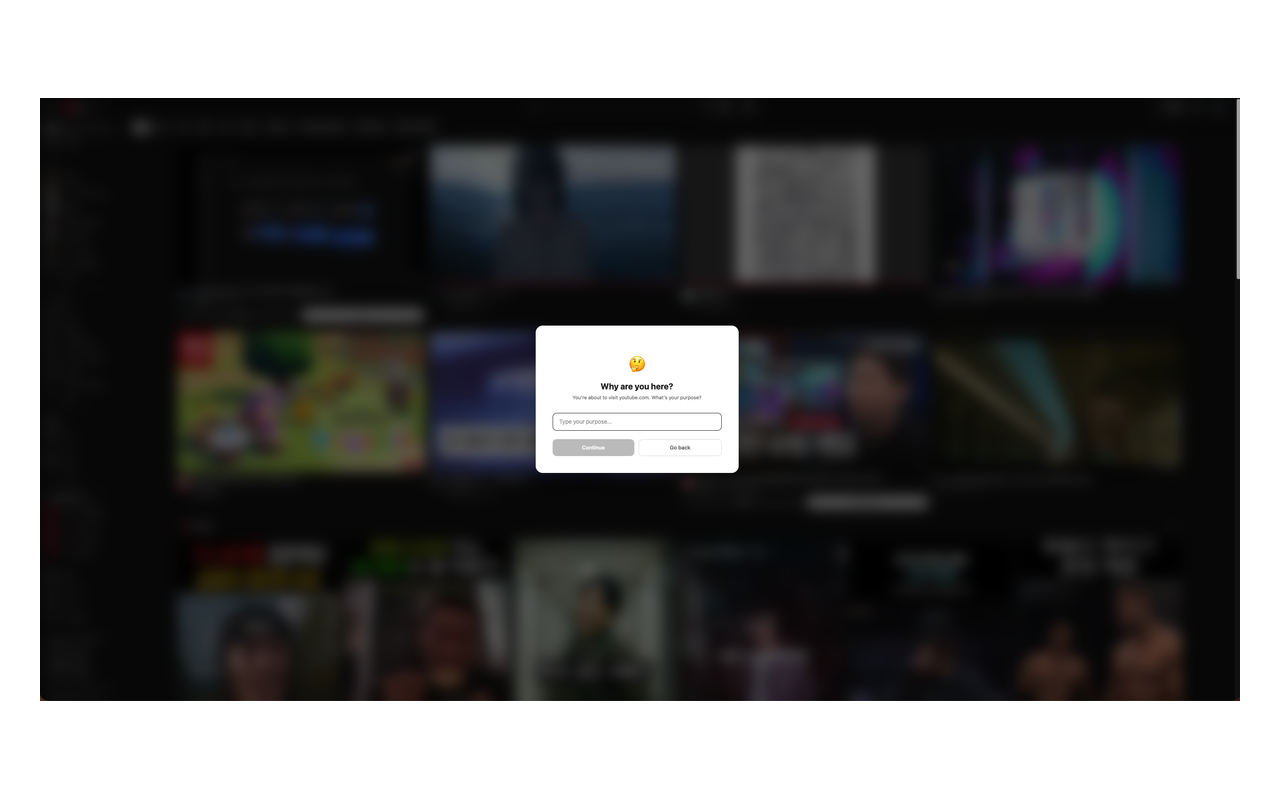
You went to check one thing, and forty minutes of feed later you cannot remember what it was. This puts a full-screen question in the way first — "Why are you here?" — and you either type an answer or go back where you came from.
Focus Guard — block distracting sites with a mindful "Why are you here?" prompt. Before you open YouTube, X (Twitter), Reddit, Instagram, Facebook, or TikTok, a full-screen overlay asks for your purpose. No purpose? Go back. Have one? Continue after a short countdown. 100% local, no tracking — nothing ever leaves your browser.
Stop mindless scrolling. Focus Guard helps you break social media addiction and build intentional browsing habits by inserting a pause — one question — before every distracting site visit. A simple digital detox tool that works in the moment of temptation, not as a rigid blocker you'll just disable.
Screenshots
What it does
Full-screen "Why are you here?" prompt on distracting websites
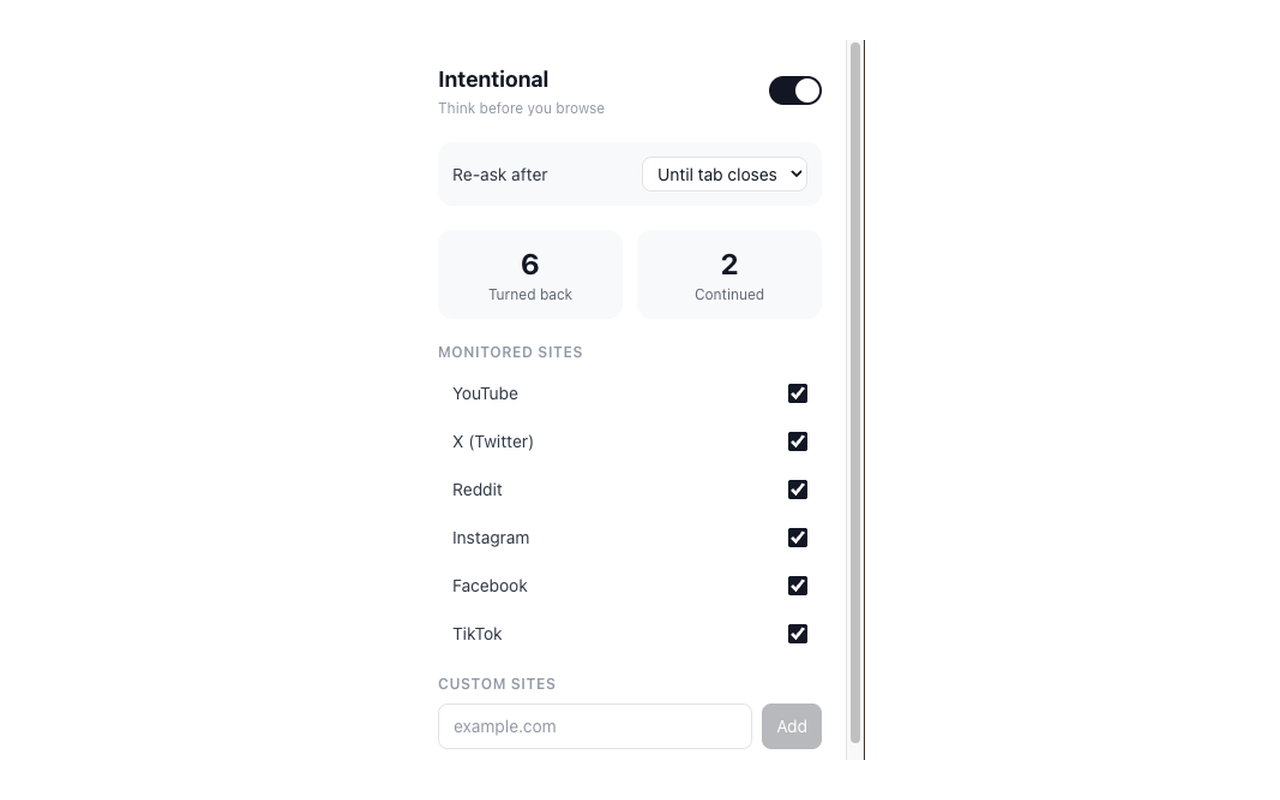
6 popular social media and video sites monitored by default (YouTube, X/Twitter, Reddit, Instagram, Facebook, TikTok)
Add any custom site you want to monitor or block
Daily stats: see how many times you turned back vs continued
Toggle individual sites on/off from the popup
Clean, minimal overlay that works on any site
Private by design
zero data collection, no accounts, 100% local processing
People trying to reduce social media use and stop mindless scrolling
Students preparing for exams who need fewer distractions
Remote workers, developers, and designers fighting focus loss during deep work
Anyone building better digital habits
digital minimalism, dopamine detox, mindful browsing
Users who found blockers like Cold Turkey, Freedom, StayFocusd, or LeechBlock too strict and want a gentler nudge instead
When you'd reach for it
The quick check that eats an hour
You open YouTube for one video and surface much later. With that domain ticked in the popup, the page is covered by a prompt naming the site you are about to visit and asking for your purpose. Answering takes three seconds, and the pause is usually enough to notice you did not have a reason.
Study blocks and deep work
Set the re-ask interval to five minutes, or to "Until tab closes", so a single answer does not buy you the rest of the afternoon. The popup counts how many times you turned back and how many times you continued today, and both numbers reset at midnight. When the session is over, flip the master toggle off.
Time sinks that are not social media
Your distraction might be a shopping site, a news homepage, or one specific forum. Type the domain into the Custom Sites field in the popup and it is guarded from that moment, with an X next to it to remove it later. Each site keeps its own on/off checkbox, so you can guard one and leave the rest alone.
Permissions & privacy
Single purpose
Focus Guard displays a full-screen prompt asking "Why are you here?" when the user visits distracting websites such as YouTube, X (Twitter), Reddit, Instagram, Facebook, and TikTok. The extension helps users browse with intention and reduce mindless scrolling by requiring them to state a purpose before accessing these sites. No data leaves the browser.
It runs only the code shipped inside the package — no remote code is fetched.
Questions people ask
How do I block distracting websites in Chrome?
Open the popup and tick the sites you want guarded. YouTube, X (Twitter), Reddit, Instagram, Facebook and TikTok are listed for you but start switched off, so nothing is interrupted until you choose it. Any other domain can be added by typing it into the Custom Sites box, and typing twitter.com is treated as x.com.
Can I still get to the site when I actually need it?
Yes. Type your purpose into the prompt and press Continue, wait out a two-second countdown, and the overlay disappears. The Continue button stays disabled while the field is empty, so you have to write something. Press Go back instead and the tab returns to the previous page, or closes if that tab has nothing to go back to.
How often does it ask again?
That is the "Re-ask after" setting in the popup: 5, 15, 30 or 60 minutes, or until the tab closes. Once you continue, that site stops asking in that tab until the interval runs out. Opening the same site in a different tab starts a fresh ask.
Does it still appear when I click from video to video on YouTube?
Yes, once the interval has expired. Sites like YouTube and Reddit swap pages without a full reload, so the extension watches for in-site navigation and re-checks at that moment rather than only on page load. That is what the webNavigation permission is for.
What permissions does it declare, and what is each one for?
The manifest declares storage, webNavigation and tabs, plus host access to all http and https sites. Storage holds your preferences in chrome.storage.local: which of the built-in sites are switched on, the custom domains you added, the re-ask interval, and today's two counters. WebNavigation catches arrivals on sites that change URL through the History API without a full reload, which is how the prompt still appears when you move from the YouTube homepage into a video. Tabs supplies the active tab's address so the extension can tell whether that tab is on a guarded site, notices when you switch tabs back to one, and lets the tab be closed when Go back has nowhere to return to. Host access is broad because the overlay is drawn by a content script that has to be able to run on whatever domain you add to the list.
Related extensions
 Eye Rest Reminder78 users
Reminds you to rest your eyes and prevent digital eye strain with gentle break reminders.
 Quick Memo74 users
A simple and elegant memo extension for your browser
 YouTube Detox47 users
Removes recommended videos from YouTube homepage and video pages.
 Notion Table & Database to CSV / Markdown2 users
Notion table to Markdown or CSV in one click. Adds a Copy button above any Notion table or database view. No login, no API.
 Air Quality Monitor
Real-time air quality monitor for Korean cities (PM2.5/PM10)
 Auto Scroll - Hands Free Page Scroller
Automatically scroll any web page at adjustable speed. Hands-free scrolling for reading, browsing, and presentations.