
Quick Memo
A simple and elegant memo extension for your browser
- Users
- 74
- Works on
- Chrome · Edge · Firefox
- Version
- 3.0.2
You need to park a phone number or a build command for ten minutes, and opening a full notes app for that is more ceremony than the thought deserves. This puts a plain text box one click away in the Chrome toolbar, and what you type stays there until you delete it.
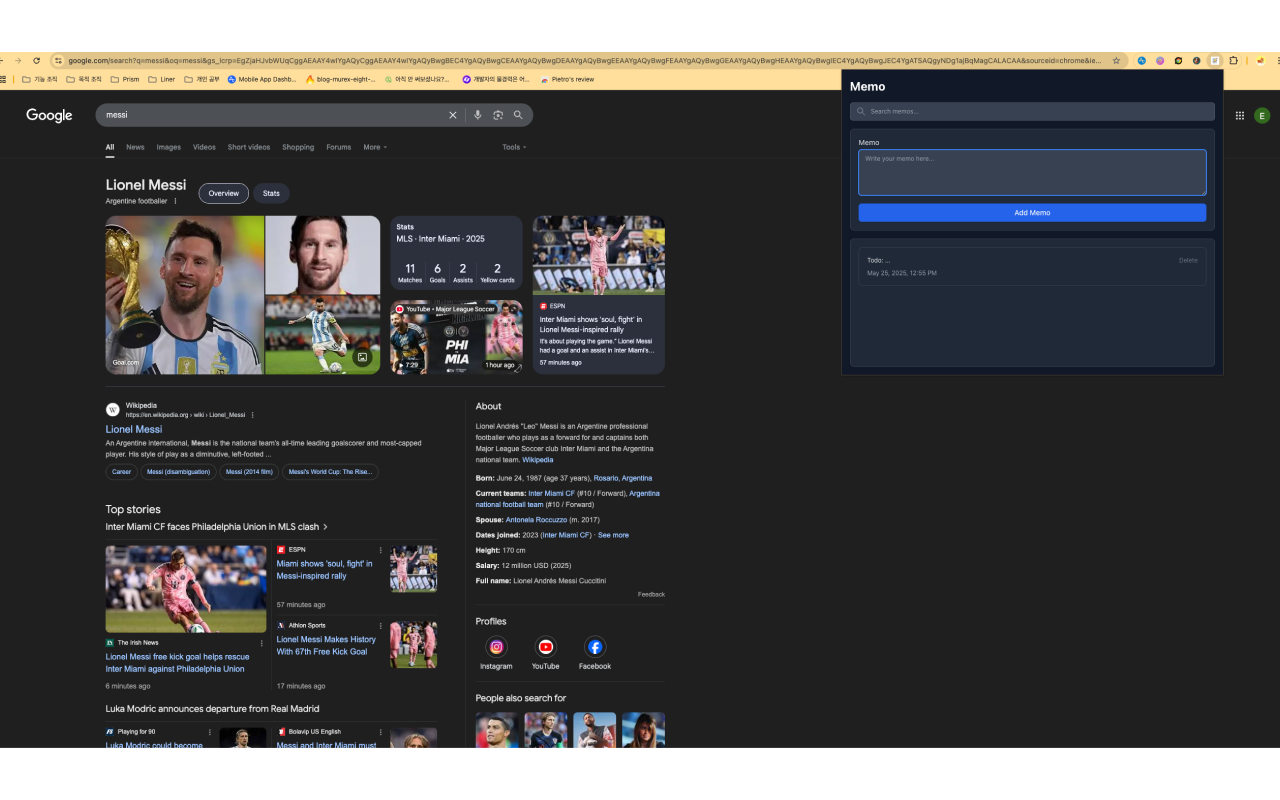
Quick Memo is a simple and elegant memo extension for Chrome. Jot down notes right from your toolbar, find them instantly with search, and keep everything neatly in one place — no accounts, no clutter.
Screenshots
What it does
One-Click Notes
Open the popup and write a memo instantly. No setup, no sign-up.
Search Your Memos
Quickly filter your notes to find exactly what you're looking for.
Add & Delete
Keep your list tidy — add new memos and remove ones you no longer need.
Clean, Minimal UI
A distraction-free interface that stays out of your way.
Local & Private
Your memos are stored on your device, not in the cloud.
When you'd reach for it
A scratchpad while you work across tabs
Park the order number, the staging URL, the command you keep retyping. The popup is wide enough to read several notes without scrolling, and the newest note sits at the top of the list with the time it was saved. Close the popup and the note is already stored.
Multi-line notes that come back exactly as typed
Everything you write goes into chrome.storage.local, which is your own browser profile on your own machine. The memo box is a multi-line field, so an address, a snippet or a short list of steps comes back exactly as you typed it. Notes stay in that profile until you delete them.
Finding a note you wrote weeks ago
The search box filters the list while you type, matching anywhere inside the note text and ignoring capitalisation. Type part of a URL, a name, an error code, and the list narrows to it. A clear button empties the box and brings the full list back.
How to use it
- 01Click the Quick Memo icon in the Chrome toolbar.
- 02Type your note and click "Add Memo."
- 03Use the search box to find a memo anytime.
- 04Delete memos you no longer need with one click.
Permissions & privacy
Single purpose
Quick Memo has a single purpose: to let users write, search, and delete short text notes from a toolbar popup. All memos are stored locally in the browser and are managed entirely within the extension. No data leaves the user's device.
Quick Memo stores all your notes locally in your browser. No memos, browsing history, or personal data are collected, stored on a server, or transmitted anywhere. It runs only the code shipped inside the package — no remote code is fetched.
Questions people ask
How do I take notes in Chrome without installing a notes app?
Pin this extension and use the toolbar popup. Click the icon, type into the memo box, press Add Memo, and the note is saved to the browser immediately. The box is a four-row text area, so multi-line notes are fine, and submitting an empty one returns a "Content is required" message instead of saving a blank entry.
Do my memos sync between computers?
No. Notes are written to chrome.storage.local, so they belong to one browser profile on one machine. A note written on your laptop will not appear on your desktop, and the popup has no export or import button.
Can I edit a memo after saving it?
Not in the current build. The popup supports adding a memo and deleting a memo, so changing something means writing the corrected note and removing the old one. Deletion is immediate and there is no undo, so be deliberate with it.
What permissions does it request, and can it read the pages I visit?
It cannot. The manifest declares exactly one permission, storage, and no host permissions at all. There are no content scripts, so nothing is injected into the sites you open.
Does the popup support dark mode and Korean?
Yes to both. The interface follows your system light or dark preference, and the extension ships English and Korean interface text that Chrome picks based on your browser language. In Korean the button reads 메모 추가 and the search field reads 메모 검색, so nothing in the popup stays in English.
Related extensions
 Eye Rest Reminder78 users
Reminds you to rest your eyes and prevent digital eye strain with gentle break reminders.
 YouTube Detox47 users
Removes recommended videos from YouTube homepage and video pages.
 Focus Guard3 users
Block distracting sites with "Why are you here?" prompt. Reduce YouTube, X, Reddit, Instagram use — digital detox, 100% local.
 Notion Table & Database to CSV / Markdown2 users
Notion table to Markdown or CSV in one click. Adds a Copy button above any Notion table or database view. No login, no API.
 Air Quality Monitor
Real-time air quality monitor for Korean cities (PM2.5/PM10)
 Auto Scroll - Hands Free Page Scroller
Automatically scroll any web page at adjustable speed. Hands-free scrolling for reading, browsing, and presentations.