
Auto Refresh - Reload Tab on Timer
Automatically reload the current tab on a timer, from 30 seconds to any interval. No ads, no tracking, no site permissions.
- Works on
- Chrome
- Version
- 3.0.3
Some pages only tell you anything when you reload them, so you sit there tapping refresh every couple of minutes. Set an interval once and the tab reloads itself on schedule, with a badge on the icon so you can see which tab is running.
Some pages you just need to keep watching — a dashboard, a live score, a queue, a status page. This reloads the current tab for you on a fixed timer so you don't have to keep pressing refresh.
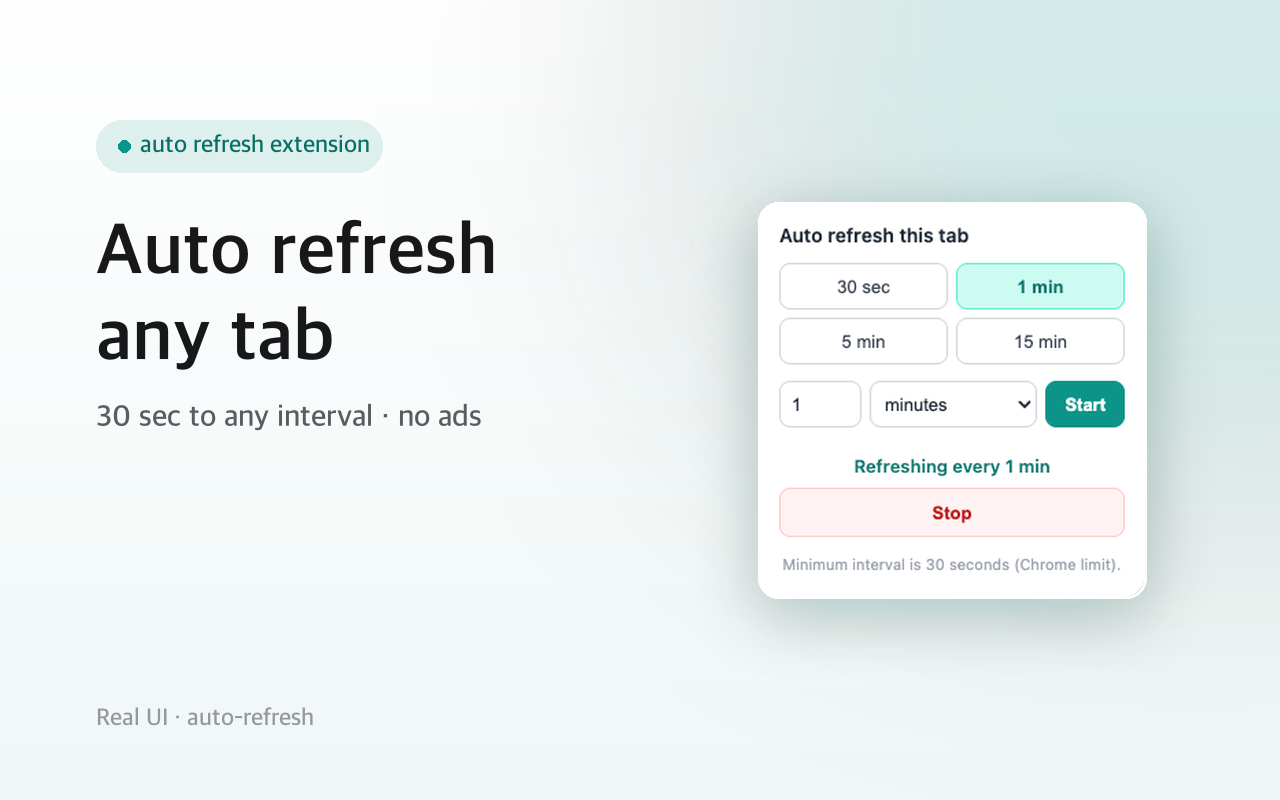
Pick a preset or type your own interval, hit Start, and the tab reloads on schedule. A badge shows when a tab is on auto-refresh. Stop it any time. It only ever touches the specific tab you started it on — it asks for no access to the sites you visit.
Clean and simple: no ads, no accounts, no tracking.
Screenshots
What it does
Reload any tab on a timer
presets or a custom interval.
A badge marks tabs that are auto-refreshing.
Per-tab: only reloads the tab you started.
No ads, no accounts, no tracking.
No access to the content of any site.
When you'd reach for it
Keeping a dashboard or status page current
Metrics dashboards, build queues and incident status pages often render once and then sit still. Start a one or five minute interval on that tab and it re-fetches on its own. Since it is a normal full page reload, anything you had typed into the page is gone, so use it on views you only read.
Watching a page that changes without notice
A results list, a stock or availability page, a queue position: nothing tells you when it moves. Put the tab on a 30-second or one-minute cycle and leave it in the background. The reloads are driven by the browser's alarm scheduler from the background worker, so the tab does not have to be the one you are looking at.
Running a screen you are not sitting at
A wallboard in the corner of the room, a second monitor showing a live view, a long-running job's progress page. Start the timer, and the badge marks that tab as scheduled. Each tab keeps its own interval, so a fifteen-minute reload on one screen and a 30-second one on another can run at the same time.
How to use it
- 01Open the tab you want to keep fresh.
- 02Click the icon, choose a preset or enter an interval.
- 03Click Start. Click Stop when you're done.
Permissions & privacy
Single purpose
Single purpose: Reload a tab the user chooses on a fixed time interval. Permission — storage: Used only to remember which tabs have an interval set, so it survives the service worker sleeping (chrome.storage.local). Permission — alarms: Used to fire the reload on schedule (chrome.alarms). Chrome's 30-second minimum applies. Host permissions: None. No host_permissions and no <all_urls>. Reloading a tab by id needs no host access, and the extension reads no page content. Remote code: None. All code is bundled; nothing is fetched or eval'd at runtime. Data collection / transmission: None. No data is collected, stored off-device, or transmitted.
Runs entirely in your browser. It stores only your chosen intervals locally and reloads the tabs you pick. It reads no page content and sends nothing anywhere. Independent extension. It runs only the code shipped inside the package — no remote code is fetched.
Questions people ask
How do I auto refresh a page in Chrome?
Open the tab you want reloaded, click the extension icon, and either tap one of the presets — 30 seconds, 1 minute, 5 minutes, 15 minutes — or type a number, pick minutes or seconds, and press Start. The popup then reads Refreshing every ... and a Stop button appears. The badge on the icon shows the tab is scheduled.
What is the shortest refresh interval?
30 seconds. That floor comes from chrome.alarms, the browser scheduler the reloads are hung off, not from a paid tier or a setting. Type a smaller number and it is raised to 30 rather than rejected. Anything above that is up to you: a decimal in the minutes box is rounded to whole seconds.
Will it reload every tab I have open?
No. A timer belongs to the specific tab you started it on, tracked by that tab's id, so the rest of your tabs are untouched. You can run different intervals on several tabs at once. Closing a tab clears its timer, and if a scheduled tab has disappeared when its turn comes, the schedule is dropped.
What permissions does this auto refresh extension need?
Two: storage and alarms. Alarms fires the reload on schedule; storage keeps the map of which tab has which interval in chrome.storage.local, so a sleeping service worker does not forget it. There are no host permissions, no <all_urls>, and no content script — reloading a tab by its id needs no access to the site, and no page content is read.
Does it keep going if I switch to another tab?
Yes. The schedule lives in the background service worker rather than in the page, so the tab can sit in the background or behind another window and still reload. It runs until you open the popup and press Stop, or until you close the tab.
Related extensions
 GitHub 한국어 (GitHub Korean)3K+ users
Turns GitHub's menus, buttons and settings labels into Korean as the page loads. Dev terms stay in the form you actually say, plus release and status alerts.
 KoreaDropdown800+ users
A Chrome extension that automatically selects 'Korea' in dropdown menus on websites.
 Naver Blog & Cafe Image Downloader9 users
Save every image from Naver Blog, Cafe, and Post in one click. Full-resolution originals in one folder, no context menu needed.
 Happy Pet - Virtual Pet7 users
A cute virtual pet companion for your new tab page
 Review Signal for Coupang — Review Trust Analyzer2 users
Trust signals for Coupang reviews: sponsored ratio, date bursts, duplicate text, rating skew. Suspicion signals, not a verdict.
 Character.AI Image & Avatar Downloader
Bulk-download the character avatars and scene images on a Character.AI page to your computer in one click. Runs locally.