Tab Manager
Manage too many tabs easily. Search, find duplicates, group by domain, and close tabs in bulk. Free tab manager and organizer.
- Version
- 3.0.2
This one is built but not on a store yet. The page is here so you can see what it does.
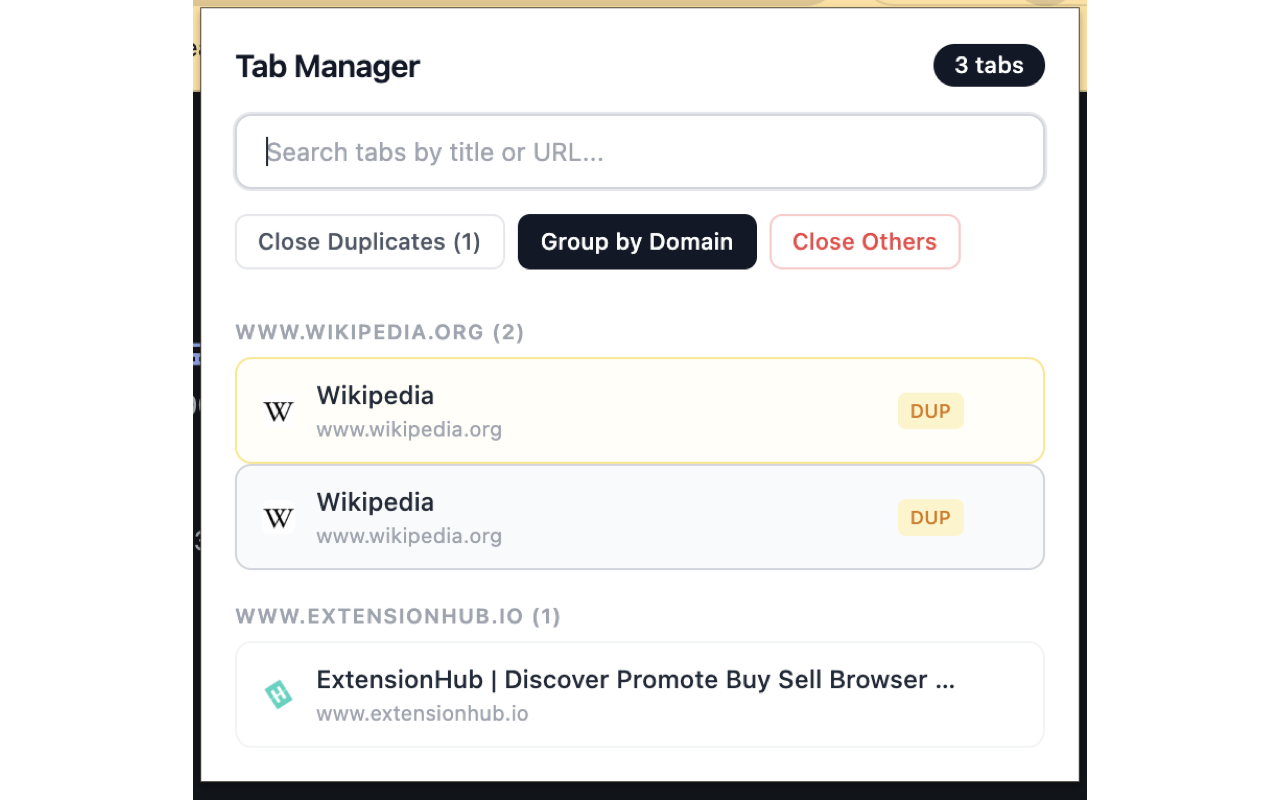
Tab Manager gives you full control over your open tabs. Search tabs in real time, find and close duplicates, group tabs by domain, close multiple tabs at once, and switch to any tab with a single click. Keep your browser organized and reduce memory usage by eliminating tab clutter.
Screenshots
What it does
Real-Time Tab Search
Instantly search across all open tabs by title or URL. Results filter as you type.
Duplicate Detection & Close
Automatically detects duplicate tabs and lets you close them with one click to free up memory.
Group by Domain
Organize your open tabs by domain name for a clear overview of which sites you have open.
Close Others
Quickly close all tabs except the current one, or close all tabs in a specific domain group.
Switch to Tab
Click any tab in the list to instantly switch to it. No more scrolling through the tab bar.
Tab Count
See the total number of open tabs at a glance.
How to use it
- 01Click the Tab Manager icon in the Chrome toolbar.
- 02Browse your open tabs in the organized list, or type in the search bar to filter.
- 03Click any tab to switch to it.
- 04Use "Close Duplicates" to remove duplicate tabs.
- 05Use "Group by Domain" to organize tabs by website.
- 06Use "Close Others" to declutter your browser.
Permissions & privacy
Single purpose
Tab Manager has a single purpose: to help users manage their open browser tabs by providing real-time search, duplicate detection and removal, domain-based grouping, and quick tab switching and closing capabilities.
Tab Manager processes all tab information locally in your browser. No tab titles, URLs, or browsing data is collected, stored, or transmitted to any external server. The extension only reads tab information to display it in the popup — nothing is recorded or shared. It runs only the code shipped inside the package — no remote code is fetched.
Related extensions
 Eye Rest Reminder78 users
Reminds you to rest your eyes and prevent digital eye strain with gentle break reminders.
 Quick Memo74 users
A simple and elegant memo extension for your browser
 YouTube Detox47 users
Removes recommended videos from YouTube homepage and video pages.
 Focus Guard3 users
Block distracting sites with "Why are you here?" prompt. Reduce YouTube, X, Reddit, Instagram use — digital detox, 100% local.
 Notion Table & Database to CSV / Markdown2 users
Notion table to Markdown or CSV in one click. Adds a Copy button above any Notion table or database view. No login, no API.
 Air Quality Monitor
Real-time air quality monitor for Korean cities (PM2.5/PM10)